Room AI guide · September 28, 2026
Room Photo Tips for AI Interior Design and Virtual Staging
A clear source photo helps explain the room you want to redesign. You do not need professional equipment, but lighting, camera position, and what you include in the frame can make the concept easier to evaluate.
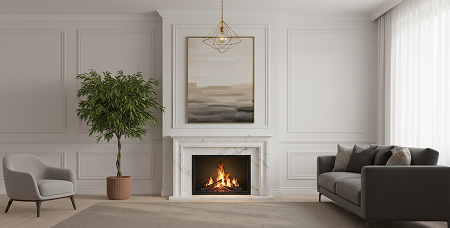
Show boundaries, not just the furniture
Include enough floor and walls to show where the room begins and ends. A close-up of the sofa gives little context for a full-room redesign. Step back where possible and choose a position that includes key corners, the main furniture, and important openings.
Use even light and a level camera
Take a daylight photo or switch on the room’s lights so the major surfaces are visible. Avoid pointing straight toward a very bright window if it leaves the rest of the room dark. Hold the phone level and review the vertical lines of doors and walls before using the image.
A wide camera setting can help fit more of a small room into the photo. Check the edges, though: ultra-wide views can stretch furniture and distort proportions. If that happens, move the phone or try another angle instead of relying on the widest setting.
Remove temporary distractions
Move laundry, bags, and objects that obscure the surfaces you want to redesign. Leave fixed features visible. You want the photo to describe the real space, so avoid concealing a doorway or covering an area that matters to the layout.
Keep a repeatable source photo
Take two or three candidate shots, then select the one that explains the room best. Use that same image when comparing design styles. Changing both the photo angle and the style makes it harder to tell what caused the difference between results.
A checklist before you generate
- The photo is sharp enough to distinguish the main furniture and room edges.
- Walls and floor are visible, with important corners included.
- Highlights and shadows do not hide major features.
- The phone is level enough that walls do not lean dramatically.
- Temporary clutter does not cover the area you want to change.
- You are comfortable sending the selected image for AI processing.
Choose a useful reference image for Design Transfer
Pick a reference that communicates the style you want: the palette, materials, furniture language, or lighting mood. Keep in mind that the reference is a visual direction. It does not guarantee an exact reproduction of every object or arrangement.
When the result looks distorted
Return to the source photo first. Try an angle that shows more of the room, reduce extreme wide-angle stretching, or use brighter light. If a result changes fixed features, compare against your original and reject the details that do not work. Generated designs are concepts, so real measurements remain essential.
Continue with the interior redesign workflow, explore virtual staging for an empty room, or compare bedroom style ideas.